I built this lab to practice onboarding Windows, Linux, and firewall telemetry into a single Splunk Enterprise instance. The configurations and screenshots below show the setup and searches I used. Where I did not retain a version or measurement, I leave it unspecified.
1. Scope and data flow
I used a single Linux-hosted Splunk Enterprise instance on a Dell PowerEdge R720. It combined receiving, indexing, and search roles. For this published example, I replaced the backend address with 192.0.2.10, a documentation-only address; replace it with your receiver address when reproducing the lab. I did not record the Splunk, forwarder, or add-on versions.
Kali logging → /var/log/syslog and /var/log/auth.log
             → Universal Forwarder → TCP 9997 → index=linux
The lab installed a Debian-package Universal Forwarder on Kali and the Unix and Linux add-on on the combined Splunk backend. Forwarding was non-TLS. The important troubleshooting finding was that a connected forwarder had no configured file inputs and the expected traditional log file did not exist.
2. Establish the receiver and forwarding path
I configured the Kali forwarder to use the same TCP 9997 receiver as the Windows endpoints. The linux index must exist on the backend before sending events to it. My setup used that index but does not preserve its creation command or configuration file; do not infer retention or storage settings from the index name.
Installation used dpkg -i with a Universal Forwarder .deb package. I did not retain the package filename, architecture, or version. My notes do not include the startup credentials, boot-start command, or original add-forward-server command.
The target recorded by my lab notes was the same receiver on port 9997. I verified the effective destination with btool; this is the corresponding single-receiver configuration:
[tcpout]
defaultGroup = default-autolb-group

[tcpout:default-autolb-group]
server = 192.0.2.10:9997
On this installation, the forwarder home was /opt/splunkforwarder. Check its effective configuration with splunk btool outputs list --debug before adding a duplicate target group.
3. Field note: connected forwarder, missing source files
My diagnostics showed a successful non-SSL connection to the receiver, while the source side remained incomplete:
usermod: user 'splunk' does not exist
cat: /opt/splunkforwarder/etc/system/local/inputs.conf: No such file or directory
/var/log/syslog: No such file or directory
The missing user explained why a command targeting splunk failed; it did not establish that root was required. The missing local file alone would not prove there were no inputs in other apps, so merged configuration should also be inspected. In this lab, my lab notes records adding the missing file inputs and enabling rsyslog as the working correction.
4. Restore the file-based logging path
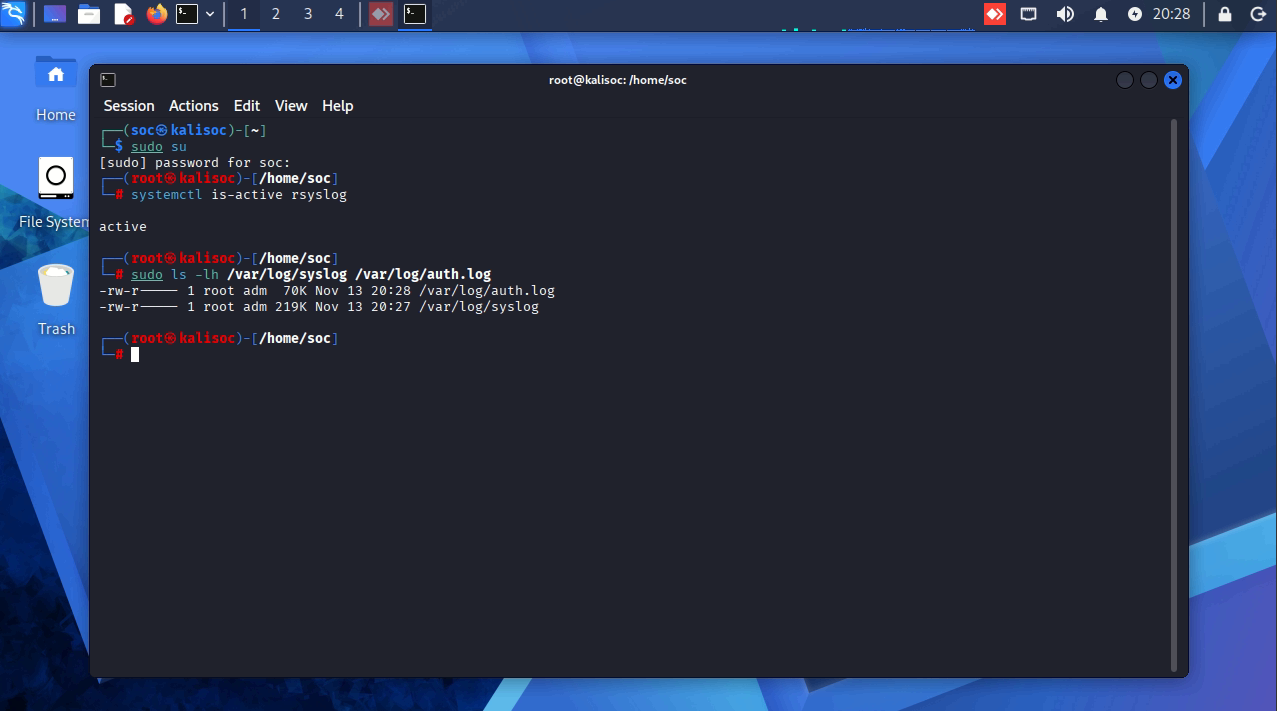
Kali was using journald, while the intended inputs targeted traditional text files. My fix installed and enabled rsyslog:
sudo apt update
sudo apt install rsyslog -y
sudo systemctl enable --now rsyslog
I confirmed that text logs then populated. That outcome depends on the distribution’s rsyslog rules; installing the package does not universally guarantee both filenames. Inspect the actual service and paths:
sudo systemctl --no-pager status rsyslog
sudo ls -lh /var/log/syslog /var/log/auth.log
sudo tail -n 10 /var/log/syslog
sudo tail -n 10 /var/log/auth.log
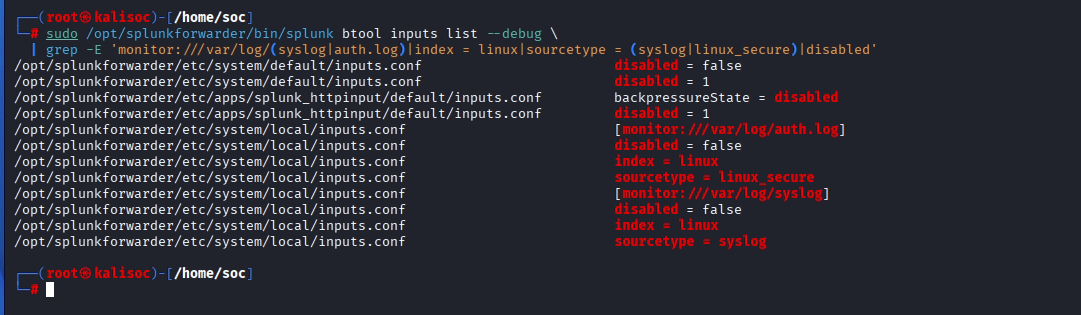
My final /opt/splunkforwarder/etc/system/local/inputs.conf was:
[monitor:///var/log/syslog]
disabled = false
index = linux
sourcetype = syslog

[monitor:///var/log/auth.log]
disabled = false
index = linux
sourcetype = linux_secure
The forwarder was restarted after this change. Check the service identity, source permissions, and effective configuration before restarting through the deployment’s actual service mechanism. Avoid launching a second splunkd instance under another account.
5. Validate collection separately from connectivity
sudo /opt/splunkforwarder/bin/splunk btool inputs list --debug
sudo /opt/splunkforwarder/bin/splunk btool outputs list --debug
sudo /opt/splunkforwarder/bin/splunk version
sudo tail -n 60 /opt/splunkforwarder/var/log/splunk/splunkd.log
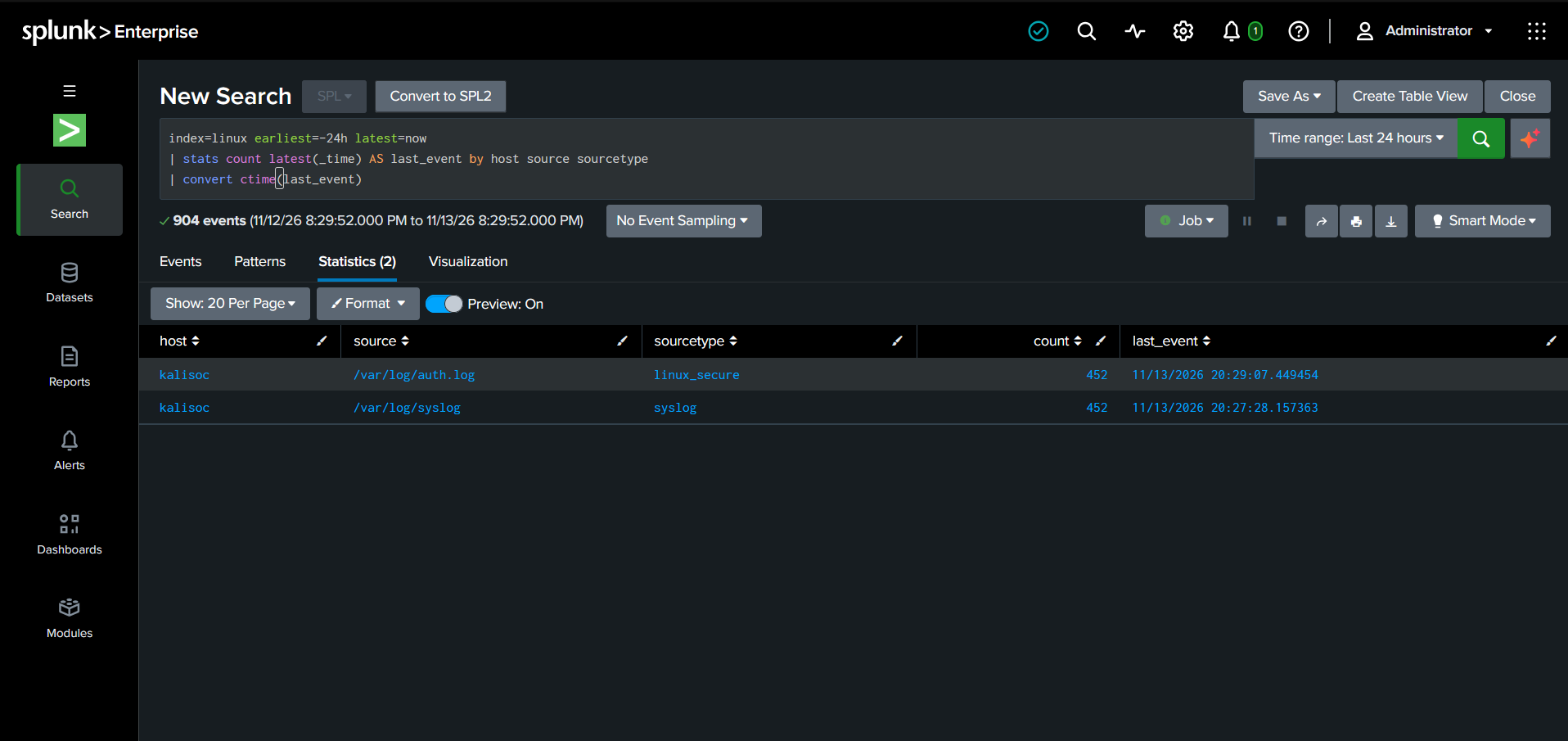
I confirmed TailingProcessor reading the files and events appearing in linux. It does not include a copied diagnostic excerpt or counts. Reproduce coverage checks using host and source, not only sourcetype:
index=linux earliest=-24h latest=now
| stats count latest(_time) AS last_event by host source sourcetype
| convert ctime(last_event)
For a fresh, low-impact system-log test, create a unique marker on Kali. This is an additional validation procedure, not a recorded historical lab command:
MARKER="Splunk-Kali-$(date -u +%Y%m%dT%H%M%SZ)"
logger -t splunk-onboarding -- "$MARKER"
printf '%s\n' "$MARKER"
sudo grep -F "$MARKER" /var/log/syslog
index=linux sourcetype=syslog earliest=-15m latest=now "Splunk-Kali-"
| table _time _indextime host source sourcetype _rawMatch the exact generated marker. This test validates the syslog path only; confirm authentication-file collection separately with an authorized login or sudo event that exists in the local file. Compare raw time, timezone, _time, and _indextime when investigating apparent delays.
6. Service identity and operational limits
The forwarder ran as root in my lab. That was the observed setup, not an inherent requirement for this input. A supported least-privileged service account can collect logs when its permissions or capabilities allow it. Account naming and privileges depend on the package version and deployment method; neither was fully retained here.
Before changing the service identity, inventory file/directory access, Splunk-owned paths, and service capabilities. Verify collection after log rotation as well as at initial startup. I did not validate hardened service permissions, log rotation, TLS, or measured ingestion throughput in this lab.
7. Results and references
I resolved two source-side gaps: missing file inputs and missing file-based logs. I confirmed that events subsequently appeared in the Linux index. I did not retain the Kali and forwarder versions, event counts, or raw event samples.
- Splunk — Linux least-privileged forwarder
- Splunk — forwarding configuration
- Splunk — btool troubleshooting
Related articles: Windows and AD onboarding and FortiGate syslog onboarding.
Onboarding new sources or troubleshooting Splunk ingestion?
Contact me to discuss Splunk data onboarding, source validation, and SIEM engineering.