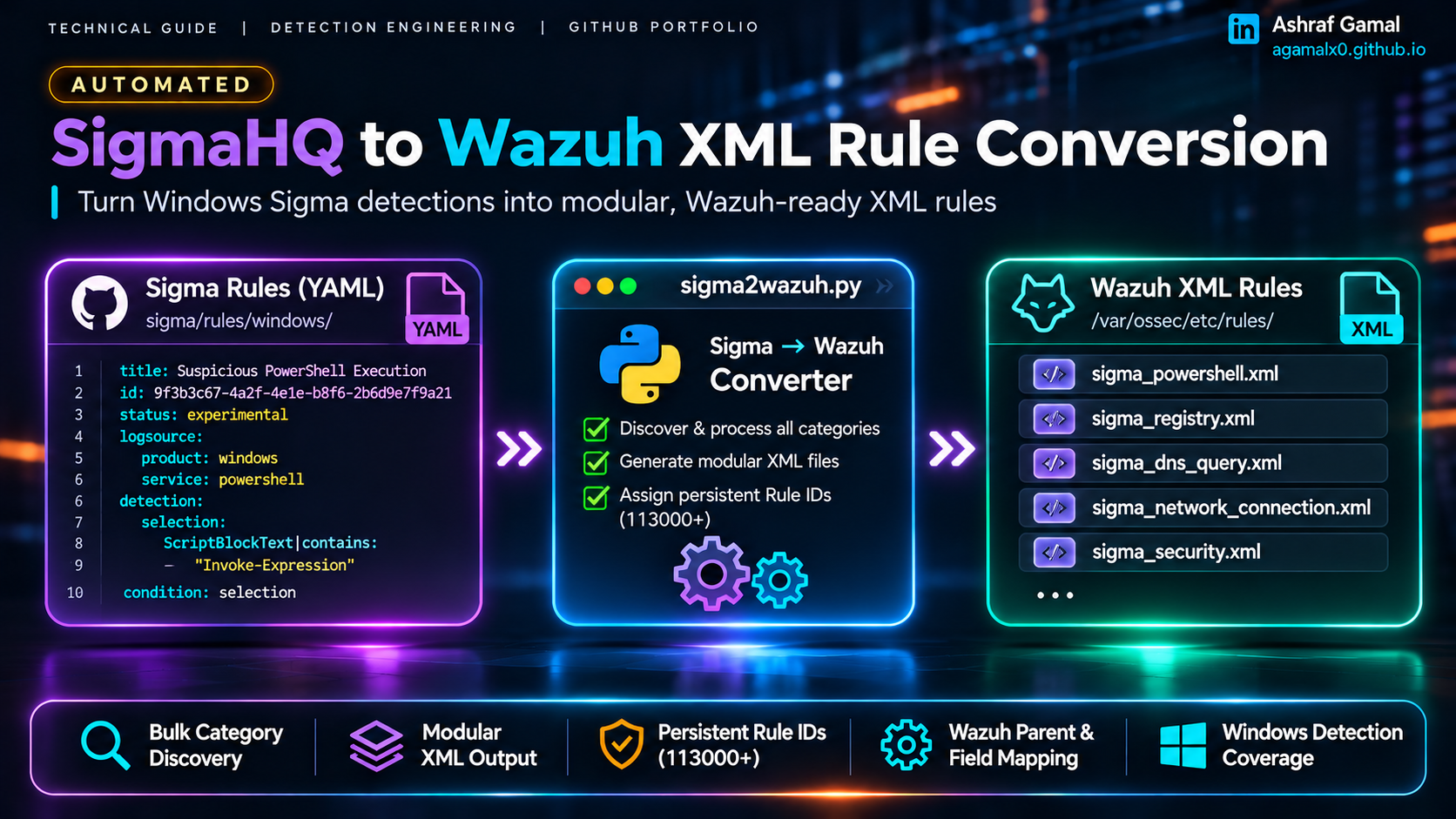
Field note: This article documents a focused conversion workflow and a Python prototype for a Wazuh 4.14.0 lab. It is not an official SigmaHQ or Wazuh backend. Conversion is a starting point for detection engineering—not proof that every Sigma rule is semantically equivalent after translation. Review and test each rule before enabling it in production.
1. Objective and scope
SigmaHQ provides vendor-neutral detection rules in YAML. Wazuh evaluates native XML rules against decoded event fields. A useful conversion workflow therefore needs more than a text substitution: it must map fields, preserve selection logic where supported, chain rules to the correct Wazuh parent rule, and assign IDs that remain stable across conversion runs.
The converter now scans the complete sigma/rules/windows tree by default. It discovers each rule's logsource.category or logsource.service, normalizes related values into an output bucket, and writes one file per discovered bucket. It does not rely on a three-category allowlist.
| Logsource examples | Output bucket | Output file |
|---|---|---|
ps_script, ps_module, classic PowerShell services | PowerShell | sigma_powershell.xml |
registry_event, registry_add, registry_delete, registry_set, registry_rename | Registry | sigma_registry.xml |
network_connection, create_remote_thread, pipe_created, wmi_event | Separate per-category files | sigma_network_connection.xml, etc. |
| Other discovered Windows categories and services | Separate per-category files | sigma_<bucket>.xml |
The only category folders intentionally excluded by the default run are process_creation and file_event. The terminal output you shared shows roughly 45–49 category XML files; the exact number is determined dynamically by the SigmaHQ checkout and its available logsource values. Rules with unsupported fields, modifiers, or condition syntax are still skipped and counted for manual review.
2. Conversion design and constraints
Custom Rule ID allocation
Wazuh recommends using IDs in the 100000–120000 range for custom rules. This workflow starts at 113000 and stores each Sigma rule UUID-to-Wazuh-ID assignment in sigma_rule_ids.json. Keep that file with the converter output and back it up: it preserves IDs when you rerun the full Windows tree or update the SigmaHQ checkout.
Parent-rule mapping
Child rules should be chained to the built-in Wazuh rule that has already recognized the relevant event type. The converter includes specific mappings for common Sysmon sources—for example, Event ID 3 uses parent SID 61605, registry Event IDs 12, 13 and 14 use 61614, 61615 and 61616, and the pipe/WMI buckets add Event ID guards under parent 61600.
Standard Windows channels also have separate parent rules: Security 60001, System 60002, Application 60003, Sysmon 60004, Defender 60005, and Windows Firewall 60016. PowerShell rules use the generic EventChannel parent 60000 with an additional channel filter for Microsoft-Windows-PowerShell/Operational or Windows PowerShell. Confirm the channel string and parent hierarchy against your local 4.14.0 ruleset and actual events before deployment.
For other Windows services that do not have a specific built-in mapping, the default fallback is 60000. The script marks these rules in its console summary. A generic parent is intentionally less selective: inspect the Sigma fields and add a verified mapping with --parent-sid CATEGORY=SID, or use --no-fallback-parent to skip categories that lack a specific mapping. Never treat a generated rule as validated solely because the XML parses.
Boolean logic and value modifiers
In a Wazuh rule, multiple field conditions are cumulative. A Sigma list of values normally means “match any value”, while the Sigma all modifier means every value must match. The converter handles supported cases by combining alternative values into a PCRE2 alternation or emitting separate conditions for all. Simple and, or, 1 of, and all of selection patterns are supported; more complex expressions are skipped for manual translation.
The included prototype supports a limited set of string modifiers, including contains, startswith, endswith, windash, re, and cased. It does not claim full Sigma specification coverage.
3. Prerequisites
- Ubuntu 22.04 or 24.04 build host with Python 3, Git, PyYAML, and
xmllint. - Wazuh Manager 4.14.0 lab or test environment with administrative access for rule validation.
- Windows endpoints forwarding the EventChannel providers represented by the Sigma rules you plan to validate, including Sysmon, PowerShell, Defender, and other relevant sources.
- A copy of existing custom XML rules so the converter can allocate IDs above the current maximum.
- Representative raw events for every category you intend to validate.
Confirm that your installed decoder actually exposes the field paths used by the converter. The mappings in a Sigma rule and the fields produced by your Wazuh decoders are not automatically interchangeable.
4. Prepare the build workstation
sudo apt update
sudo apt install -y git python3 python3-yaml libxml2-utils

mkdir -p ~/sigma-wazuh-custom
cd ~/sigma-wazuh-custom

git clone --depth 1 https://github.com/SigmaHQ/sigma.git
Download the focused converter from the portfolio repository and make it executable:
cd ~/sigma-wazuh-custom
curl -fL \
  https://agamalx0.github.io/downloads/sigma2wazuh.py \
  -o sigma2wazuh.py
chmod +x sigma2wazuh.py
python3 -m py_compile sigma2wazuh.py
Download the sigma2wazuh.py converter. The script discovers all Windows logsource buckets by default and keeps unsupported rule logic fail-closed: an unmapped Sigma field or unsupported condition is skipped instead of being converted into a generic full-event text match. The optional --include argument remains available when you deliberately want a smaller test run.
5. Run the all-category conversion
Run the converter against the full Windows rules directory. No --include argument is needed: omitting it enables dynamic discovery of every category/service bucket found in this SigmaHQ checkout. The two default exclusions are explicit in the command so the scope is visible.
mkdir -p "$HOME/wazuh-existing-rules"
# Copy existing custom XML rules into this directory before allocating IDs.

./sigma2wazuh.py \
  --input "$HOME/sigma-wazuh-custom/sigma/rules/windows" \
  --output-dir "$HOME/sigma-wazuh-custom/output_xml" \
  --exclude process_creation file_event \
  --start-id 113000 \
  --group sigma_wazuh \
  --prefix "SN - " \
  --fallback-parent-sid 60000 \
  --existing-xml "$HOME/sigma-wazuh-custom/output_xml/*.xml" \
                "$HOME/wazuh-existing-rules/*.xml"
The script groups PowerShell variants into sigma_powershell.xml and registry variants into sigma_registry.xml; other categories/services retain their own output file. Known Sysmon and Windows-channel parents are applied from the mapping table. Unmapped services use the configured fallback parent and are flagged in the console summary. You can override a specific category with --parent-sid CATEGORY=SID, or disable generic fallback with --no-fallback-parent.
The following names are representative of the category files visible in your terminal output. The exact set can change when SigmaHQ adds, removes, or reorganizes Windows logsource categories and services:
output_xml/
├── sigma_application.xml
├── sigma_appmodel.xml
├── sigma_appxdeployment_server.xml
├── sigma_appxpackaging_om.xml
├── sigma_bits_client.xml
├── sigma_capi2.xml
├── sigma_certificateservicesclient_lifecycle_system.xml
├── sigma_codeintegrity_operational.xml
├── sigma_create_remote_thread.xml
├── sigma_create_stream_hash.xml
├── sigma_diagnosis_scripted.xml
├── sigma_dns_client.xml
├── sigma_dns_query.xml
├── sigma_dns_server.xml
├── sigma_driver_framework.xml
├── sigma_driver_load.xml
├── sigma_file_access.xml
├── sigma_file_change.xml
├── sigma_file_delete.xml
├── sigma_file_executable_detected.xml
├── sigma_firewall_as.xml
├── sigma_lsa_configuration.xml
├── sigma_lsa_server.xml
├── sigma_microsoft_servicebus_client.xml
├── sigma_msexchange_management.xml
├── sigma_network_connection.xml
├── sigma_ntlm.xml
├── sigma_openssh.xml
├── sigma_pipe_created.xml
├── sigma_powershell.xml
├── sigma_process_access.xml
├── sigma_registry.xml
├── sigma_security_mitigations.xml
├── sigma_security.xml
├── sigma_shell_core.xml
├── sigma_smbclient_security.xml
├── sigma_sysmon_error.xml
├── sigma_sysmon.xml
├── sigma_system.xml
├── sigma_taskscheduler.xml
├── sigma_terminalservices_localsessionmanager.xml
├── sigma_windefend.xml
├── sigma_windows.xml
├── sigma_wmi_event.xml
└── sigma_winrm.xml

sigma_rule_ids.json
The converter also writes an XML file for a discovered bucket even if all rules in that bucket are skipped as unsupported. In that case, the file contains an empty Wazuh group and the console shows 0 rules; file presence means the category was discovered, not that detections were translated.
The console summary reports the number of Sigma rules converted, Wazuh XML rules built, excluded source files, unsupported/skipped rules, category files written, and any rules using the generic fallback parent. A skipped rule is a review item—not a conversion failure to work around by weakening the mapping.
6. Validate generated XML locally
Validate every generated file before copying anything to the Wazuh Manager:
set -e
for file in ~/sigma-wazuh-custom/output_xml/sigma_*.xml; do
  xmllint --noout "$file"
  printf '[OK] %s\n' "$(basename "$file")"
done
xmllint confirms XML well-formedness only. It does not validate Wazuh rule semantics, parent SIDs, decoded field names, PCRE2 behavior, or the detection outcome.
7. Stage and validate on Wazuh Manager
Back up the existing rules and transfer the candidate files to the manager. Use a staging directory first, then install the files under the custom rules directory:
# On the build workstation
scp ~/sigma-wazuh-custom/output_xml/sigma_*.xml \
  user@<WAZUH_MANAGER_IP>:/tmp/

# On the Wazuh Manager
sudo install -o wazuh -g wazuh -m 660 \
  /tmp/sigma_*.xml /var/ossec/etc/rules/
Run the Wazuh rule-engine configuration test before restarting the manager:
sudo /var/ossec/bin/wazuh-analysisd -tIf compilation fails, do not restart the manager. Review the reported file and line, correct the candidate XML, and repeat the test. Only restart after the analysis daemon test completes successfully:
sudo systemctl restart wazuh-manager
sudo systemctl is-active wazuh-manager
8. Validate detection logic with wazuh-logtest
Compilation does not prove a detection works. Run wazuh-logtest and feed it a representative event captured from an endpoint. The following is a Sysmon Event ID 3 field-shape example for a network connection; it is not a guaranteed match for a particular Sigma rule:
{"win":{"system":{"providerName":"Microsoft-Windows-Sysmon","eventID":"3","channel":"Microsoft-Windows-Sysmon/Operational","computer":"WKSTN-01"},"eventdata":{"image":"C:\\Windows\\System32\\WindowsPowerShell\\v1.0\\powershell.exe","sourceIp":"192.0.2.10","sourcePort":"51432","destinationIp":"203.0.113.10","destinationPort":"4444","protocol":"tcp","initiated":"true"}}}For each rule you intend to enable, test both a matching event and a benign near-match. Review all three phases:
- Phase 2: verify that the event is decoded and the expected
win.systemandwin.eventdatafields are populated. - Parent match: confirm the expected Sysmon or PowerShell parent SID is reached for the event type.
- Phase 3: confirm the custom Rule ID,
SN -description,sigma_wazuhgroup, severity level, and MITRE ATT&CK ID where present.
In the Wazuh Dashboard, use the rule group to review the generated detections:
rule.groups: "sigma_wazuh"Keep the test evidence with the rule file: Sigma source UUID, source filename, generated Rule ID, test event, expected result, observed result, and reviewer decision.
9. Known limitations and safe operating practices
- Not a full Sigma backend: nested conditions, correlation rules, time windows, unsupported modifiers, and unmapped fields are skipped. Manual translation is required for unsupported rules.
- Field maps are environment-dependent: validate each mapping against the JSON produced by your installed Wazuh decoder and the event sources actually collected.
- Parent SIDs are version-sensitive: inspect the manager's local ruleset; do not assume a sample SID is valid for every Wazuh release or log channel.
- Rule IDs require state: retain
sigma_rule_ids.json, include existing custom XML files in the scan, and review IDs before merging outputs from multiple build hosts. - PCRE2 has operational cost: the converter can scan every category, but deploy generated files in controlled batches, test throughput and queue behavior, and tune noisy rules before enabling the full set.
- Fallback parents need review: generic
60000is not equivalent to a category-specific parent. Review every rule flagged as using the fallback and tighten its event/channel conditions or provide a verified override. - Keep rollback simple: deploy by category and disable one category file at a time if its detections create noise or performance pressure.
Do not treat a successful XML parse or a clean wazuh-analysisd -t result as approval for unattended deployment. The final acceptance criterion is correct matching against representative telemetry, with no unexpected matches against benign events.
10. Key lessons
- Discover all Windows Sigma logsource categories dynamically, while excluding only the two source folders intentionally out of scope.
- Keep generated rules modular. Separate files make tuning, review, and rollback more controlled.
- Preserve Sigma UUID-to-Wazuh Rule ID mappings across runs to avoid unnecessary ID churn.
- Fail closed on unsupported fields and conditions. A skipped rule is safer than a rule that matches the wrong part of an event.
- Validate the XML, Wazuh compilation, and actual event behavior as separate checks.
11. Official references
- Wazuh — Custom rules and Rule ID range
- Wazuh — Rules XML syntax, fields, groups and parent SIDs
- Wazuh — Testing rules with wazuh-logtest
- Wazuh — Windows event-channel rule files and ID ranges
- SigmaHQ — Official rule repository
- SigmaHQ — Sigma specification
- Wazuh — Sysmon parent rules (inspect the version installed on your manager)
Building a practical Sigma-to-Wazuh pipeline or tuning detections at scale?
Connect to discuss Wazuh engineering, detection development, SOC automation, and SIEM/SOAR operations.