Personal note: This article reflects my experience and is for educational purposes only—not official vendor guidance. Always verify procedures against current vendor documentation.
This guide covers a distributed deployment, not an all-in-one install. The topology below is a reference design based on the architecture and load-balancing work documented in my lab. Confirm every node role, IP, port, and sizing decision against your actual environment before implementation.
1. Architecture at a glance
Wazuh has three central components: the Wazuh server (manager and Filebeat), the Wazuh indexer, and the Wazuh dashboard. In a distributed design, these components run on separate hosts so that ingestion, indexing, and user access can be sized and operated independently.
| Layer | Reference design | Purpose |
|---|---|---|
| Indexer | 2 indexer nodes | Stores and searches alerts; indexer clustering provides scale and resilience when correctly designed. |
| Wazuh server | 1 master + 2 workers | Receives agent data, analyzes events, manages cluster configuration, and forwards alerts to the indexer. |
| Dashboard | 1 dashboard node | Provides the analyst interface and connects to the indexer and Wazuh server API. |
| Load balancing | HAProxy / VIP layer where required | Provides a stable endpoint for selected traffic; it does not replace native Wazuh clustering. |
This layout reflects the multi-node topology explored in my deployment planning. It is not a universal minimum. In particular, a two-node indexer cluster needs deliberate quorum and failure-domain planning; do not assume that adding a second node alone guarantees availability under every failure scenario.
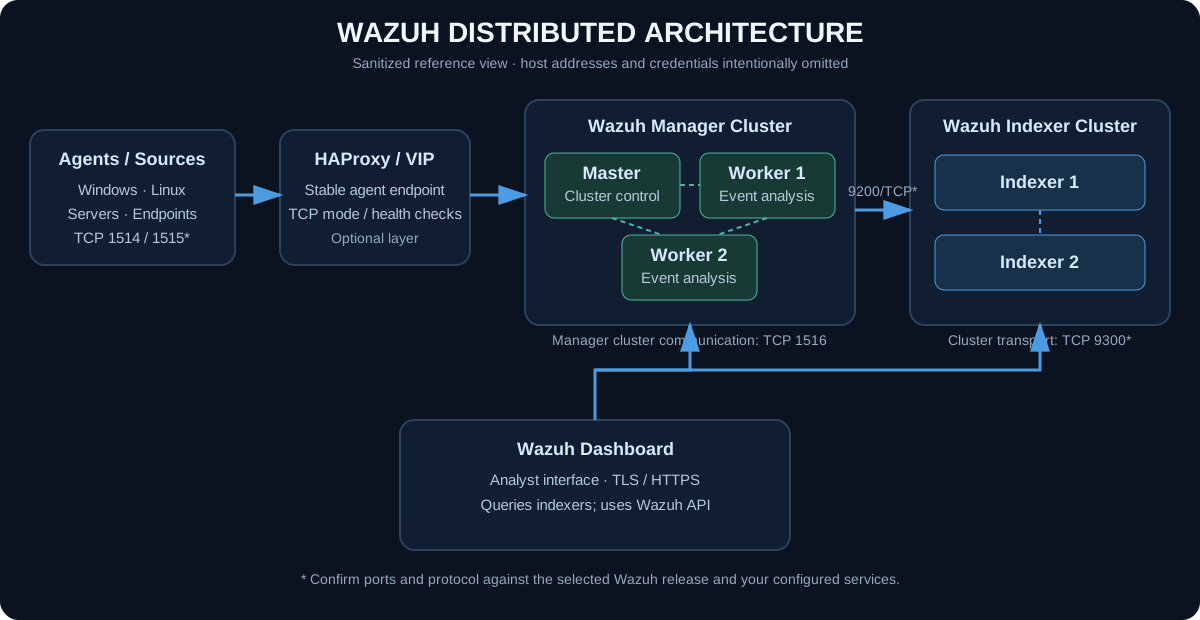
2. Know each node's job
- Wazuh indexer: stores and searches alert data. Multi-node clusters require consistent node names, transport connectivity, certificates, and cluster configuration.
- Wazuh server master: coordinates manager-cluster configuration and tasks. It is not automatically the best endpoint for every agent's event traffic.
- Wazuh server workers: handle agent connections and analysis as configured. Manager clustering does not mean every setting or every piece of runtime state is replicated identically; follow the cluster documentation.
- Dashboard: serves the web interface. Configure its indexer endpoints and Wazuh API endpoint(s) explicitly, and protect access with TLS and network controls.
- HAProxy / VIP: optionally exposes a stable agent or service endpoint. Design each frontend for the actual protocol and failover requirement; do not put all Wazuh traffic through one generic backend.
3. Plan before installing
- Choose a supported Wazuh release and OS for every host. Keep the central components on a compatible release set.
- Assign a unique hostname and static IP to every node. Do not reuse a hypervisor IP for a guest VM.
- Define indexer node names, manager master/worker roles, dashboard address, and any VIP/DNS names before generating certificates.
- Size CPU, RAM, and persistent storage using expected endpoint count, event volume, query load, and retention—not node count alone.
- Prepare firewall rules between the specific source and destination components. Open only required ports.
- Plan backups, monitoring, certificate renewal, index retention, and how each node will be recovered or replaced.
Use stable names such as indexer-1, indexer-2, wazuh-master, wazuh-worker-1, wazuh-worker-2, and wazuh-dashboard. Replace these examples with real DNS names and addresses. Avoid embedding lab IPs in reusable deployment documentation.
4. Install in the correct order
For a distributed deployment, use Wazuh's version-matched installation assistant or follow the step-by-step documentation. The high-level sequence is:
- Generate configuration, certificates, and passwords. Define every indexer, server, and dashboard node in the configuration file before creating the certificate bundle.
- Install all indexer nodes. Use the exact node names from the configuration and initialize the indexer cluster once, following the official procedure.
- Install the Wazuh server nodes. Configure the master and workers, then establish the manager cluster according to the documented steps.
- Install the dashboard. Point it to the indexer nodes and the intended Wazuh server API endpoint.
- Configure agent endpoints and any load balancer. Confirm the agent destination, enrollment path, protocol, and failover design.
- Validate before onboarding production agents. Check service status, cluster health, connectivity, and end-to-end event flow.
Example for downloading the release-matched assistant on a trusted admin session:
curl -sO https://packages.wazuh.com/4.14/wazuh-install.shDo not run an all-in-one option for this topology. The following illustrates the release-matched assistant sequence; use the exact node names defined in your generated configuration and follow the current official guide before executing it.
# On the administration host: generate node inventory and certificates
sudo bash ./wazuh-install.sh --generate-config-files

# On each indexer host, using its configured node name
sudo bash ./wazuh-install.sh --wazuh-indexer <INDEXER_NODE_NAME>

# Once all indexers are installed, initialize the cluster on the designated node
sudo bash ./wazuh-install.sh --start-cluster

# On each manager host, using the configured node name
sudo bash ./wazuh-install.sh --wazuh-server <MANAGER_NODE_NAME>

# On the dashboard host, using its configured node name
sudo bash ./wazuh-install.sh --wazuh-dashboard <DASHBOARD_NODE_NAME>
These are command patterns, not copy-and-run values: options and ordering must match the exact Wazuh release. Keep the generated certificate/password bundle out of source control, transfer required files only through an approved restricted channel, and follow the official procedure for copying files to each host.
Wazuh's distributed installation uses generated certificates and passwords. Transfer required files only over a controlled channel, restrict file permissions, and remove temporary copies according to your organization's secure deployment procedure. Never reuse a certificate bundle from a different node inventory.
5. Network paths and load balancing
| Traffic | Typical port | Design check |
|---|---|---|
| Agent event communication | TCP 1514 | Confirm agent protocol and destination; test that traffic reaches a manager listener. |
| Agent enrollment | TCP 1515 | Confirm enrollment is enabled and routed to the intended service. |
| Wazuh API | TCP 55000 | Restrict to authorized dashboard and administration paths. |
| Indexer API | TCP 9200 | Restrict to trusted platform components and administrators. |
| Indexer cluster transport | TCP 9300 | Allow only between the required indexer nodes; verify against the release documentation. |
| Dashboard | TCP 443 | Expose only through approved user-access paths and valid TLS configuration. |
These are common defaults, not a substitute for the official port matrix for your release and configuration. Firewall rules must reflect the actual flow between nodes.
In my lab planning, HAProxy was used as a stable agent-facing endpoint, with workers as the primary backend pool and a master fallback considered for the relevant traffic. Treat that as a topology-specific design, not a universal Wazuh recommendation: registration and event traffic have different operational considerations, and the master should not be used as a fallback unless the routing behavior and capacity have been deliberately tested.
Example HAProxy TCP backend pattern
This sanitized example shows the structure of a worker-first pool. Replace placeholders locally. Confirm manager listeners and your enrollment design before enabling an optional master backup. Do not expose the HAProxy statistics page publicly.
defaults
    mode tcp
    timeout connect 5s
    timeout client  1m
    timeout server  1m

frontend wazuh-agent-events
    bind *:1514
    default_backend wazuh-workers-events

backend wazuh-workers-events
    balance leastconn
    option tcp-check
    server worker1 <WORKER_1_IP>:1514 check
    server worker2 <WORKER_2_IP>:1514 check
    # Optional only after failover testing:
    # server master <MASTER_IP>:1514 check backup

frontend wazuh-agent-enrollment
    bind *:1515
    default_backend wazuh-workers-enrollment

backend wazuh-workers-enrollment
    balance leastconn
    option tcp-check
    server worker1 <WORKER_1_IP>:1515 check
    server worker2 <WORKER_2_IP>:1515 check
    # Optional only after failover testing:
    # server master <MASTER_IP>:1515 check backup
Validate the configuration before reloading HAProxy. Test normal routing and worker failure with a controlled test agent before routing production traffic.
sudo haproxy -c -f /etc/haproxy/haproxy.cfg
sudo systemctl status haproxy --no-pager
sudo journalctl -u haproxy -n 100 --no-pager
sudo ss -lntp | grep -E ':(1514|1515)\\b'
For a TCP frontend, validate both the listener and real traffic. A backend marked UP only proves that its configured health check passed; it does not prove agents are using the VIP.
sudo ss -lntp
sudo systemctl status haproxy --no-pager
sudo journalctl -u haproxy -n 100 --no-pager
6. Validate each layer
Indexer cluster
Use an authorized account and the certificate/trust settings appropriate for your environment. Do not put passwords directly in shell history.
curl --cacert /path/to/root-ca.pem -u admin https://<indexer-node>:9200/_cluster/health?prettyCheck the reported cluster status and node count, then inspect node membership and logs if expected nodes are missing. A green status by itself does not validate manager ingestion or dashboard connectivity.
Manager cluster and services
sudo systemctl status wazuh-manager filebeat --no-pager
sudo /var/ossec/bin/cluster_control -l
Confirm the expected master and workers appear in the cluster output. Check the manager logs on the affected node if cluster membership or agent connections are not as expected.
Dashboard and end-to-end event flow
- Confirm the dashboard service is running and the UI is reachable over HTTPS.
- Verify the dashboard can reach the configured indexer nodes and Wazuh API.
- Enroll a test agent and confirm it becomes active.
- Generate a known test event and verify it appears in the expected alert view.
- Test a planned worker failure in a maintenance window and verify agent behavior, alert continuity, and recovery.
Commands used to validate the layers
# Indexer cluster health (use trusted CA and hostname in production)
curl --cacert /path/to/root-ca.pem -u admin 'https://<INDEXER_FQDN>:9200/_cluster/health?pretty'

# Manager cluster and service state
sudo /var/ossec/bin/cluster_control -l
sudo systemctl status wazuh-manager filebeat --no-pager

# Network listeners and agent connections
sudo ss -lntp | grep -E ':(1514|1515|1516|55000|9200|9300)\\b'
sudo /var/ossec/bin/agent_control -l

# Recent manager events for triage
sudo tail -n 100 /var/ossec/logs/ossec.log
sudo tail -n 50 /var/ossec/logs/alerts/alerts.json
Point a Linux agent at the new manager endpoint
For an agent being enrolled against the distributed environment, use the approved VIP or load-balancer DNS name. This is a sanitized version of the endpoint-migration workflow; use it only when the agent needs enrollment and the configured enrollment service is available.
# On the agent: request enrollment against the new endpoint
sudo /var/ossec/bin/agent-auth -m <MANAGER_VIP_OR_HOSTNAME>

# Confirm the configured server endpoint in ossec.conf
sudo grep -A5 -B1 '<server>' /var/ossec/etc/ossec.conf
sudo systemctl restart wazuh-agent
sudo systemctl --no-pager status wazuh-agent
If the agent is already enrolled and only its destination changes, update the <server> address in /var/ossec/etc/ossec.conf to the approved endpoint, then restart the agent and verify its state from the manager. Do not bulk-replace endpoint addresses until you have a tested rollback and a small pilot group.
Run indexer API checks from an authorized host only. Do not publish raw output if it includes private addresses, hostnames, agent identifiers, or sensitive event content.
7. Fast troubleshooting checklist
| Symptom | Check first |
|---|---|
| Indexer is green but alerts are absent | Check manager service, Filebeat, output configuration, indexer reachability, and recent logs. |
| Manager worker missing from cluster | Check node names, cluster key/configuration, time sync, required network paths, and manager logs. |
| HAProxy backends are UP but counters stay at zero | Confirm agents target the VIP, check the frontend listener and firewall path, and observe actual traffic. |
| Agent cannot enroll | Check DNS/IP destination, TCP 1515 path, enrollment configuration, and manager logs. |
| Dashboard opens but data is unavailable | Check dashboard-to-indexer connectivity, certificates, configured indexer endpoints, and dashboard logs. |
Diagnose from the first failing layer and preserve timestamps and relevant logs. Avoid changing several components at once; one change followed by a clear validation makes the cause easier to identify.
8. Official documentation
- Wazuh installation guide
- Indexer cluster assisted installation
- Wazuh server installation and cluster configuration
- Wazuh dashboard installation
- Wazuh server cluster
- Wazuh indexer cluster
This is a practical architecture guide, not a substitute for release-specific vendor instructions. Confirm compatibility, port requirements, certificates, sizing, and failure behavior before deploying to production.
Planning a distributed Wazuh deployment or troubleshooting cluster communication?
Contact me to discuss SIEM architecture, Wazuh implementation, high availability, and platform operations.