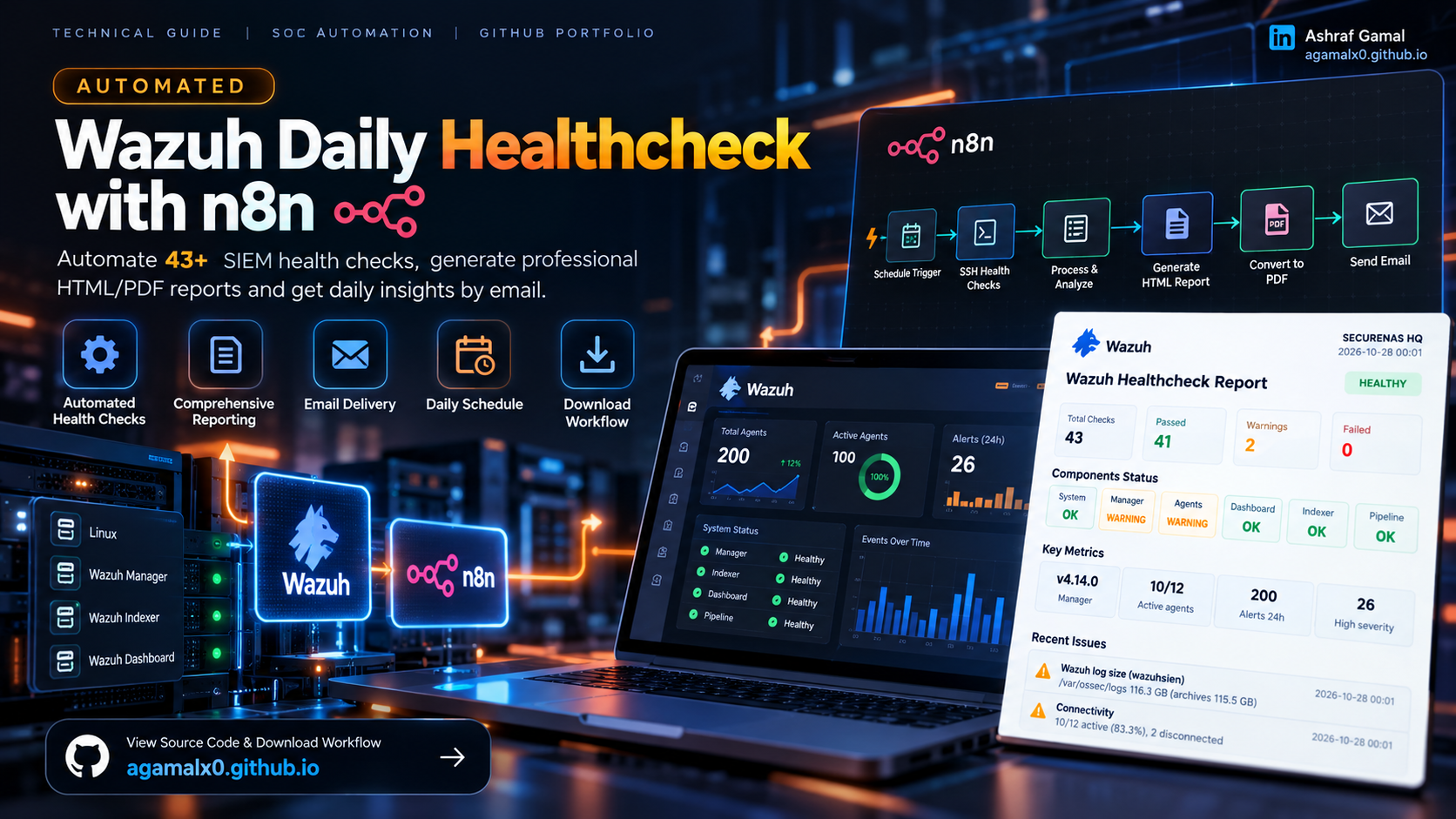
Scope: This article documents the workflow shown in my n8n execution and the accompanying healthcheck report. Node settings, remote commands, and host topology are deployment-specific; adapt and validate them in a test environment before use.
1. Overview
A SIEM can remain online while accumulating operational issues: disconnected agents, growing archives, storage pressure, service interruptions, or pipeline delays. A daily healthcheck makes these conditions easier to review consistently instead of relying only on occasional manual checks.
The workflow described here is called Wazuh Daily Healthcheck PDF over Email. It supports a manual execution for testing and a daily schedule. It gathers host and service information over SSH, builds a structured HTML report, converts that report to PDF with Gotenberg, and sends the PDF by email.
The captured run contained 43 checks: 41 passed and 2 warnings. The warnings were an oversized Wazuh log/archive directory and two disconnected agents. These are example snapshot values—not universal thresholds or expected results for every deployment.
2. Workflow at a glance
The screenshot below is the actual n8n canvas used for this workflow. It shows both the manual test trigger and the daily schedule, followed by configuration, SSH collection, report generation, HTML-to-PDF conversion, and email delivery.
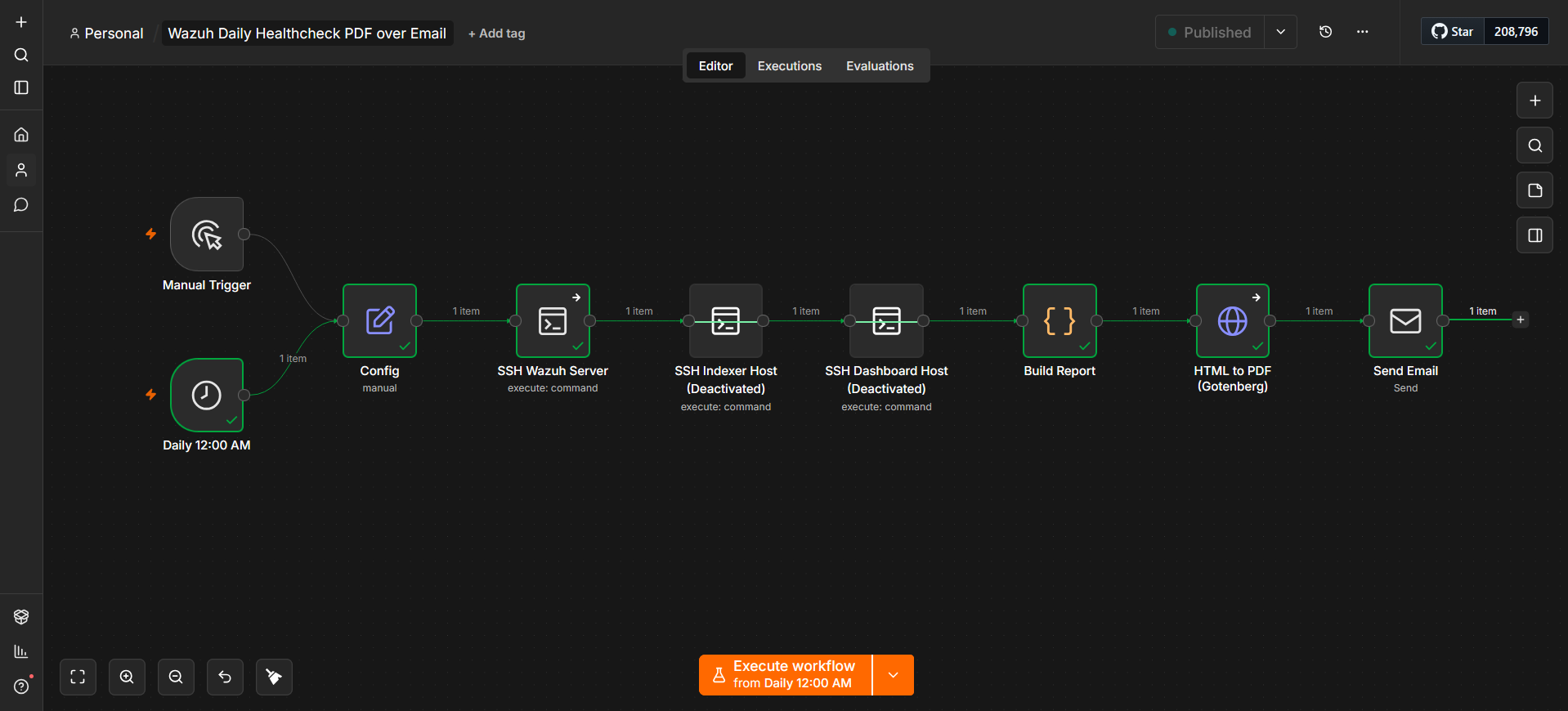
| Node / stage | Purpose | Implementation note |
|---|---|---|
| Manual Trigger | Run the workflow on demand during development or troubleshooting. | Use this path first when validating changes. |
| Daily 12:00 AM | Starts the scheduled daily check. | Confirm the n8n instance timezone; the schedule follows the configured workflow/instance timezone. |
| Config | Stores environment-specific report inputs and settings. | Keep hostnames, report labels, thresholds, and recipient settings configurable rather than hard-coded throughout the workflow. |
| SSH Wazuh Server | Runs remote collection commands against the Wazuh host. | Use a dedicated, least-privileged account and only the read access required by the chosen checks. |
| SSH Indexer Host / SSH Dashboard Host | Optional checks for separately hosted components. | These nodes were marked deactivated in the shown workflow. Enable and test them only when the architecture uses separate hosts and the report builder expects their data. |
| Build Report | Combines collected outputs, status results, metrics, and recommended actions into HTML. | Validate missing or malformed command output so one failed check does not silently become an “OK” result. |
| HTML to PDF (Gotenberg) | Converts the generated HTML report into a PDF file. | n8n must be able to reach the Gotenberg endpoint; the request must send the HTML file in the expected multipart form. |
| Send Email | Delivers a concise message and the generated PDF attachment. | Store SMTP/email credentials in n8n Credentials, not inside code or exported files. |
The pictured execution completed successfully in about 26 seconds. Execution duration depends on SSH response times, command count, report size, PDF rendering, and mail delivery.
3. What the generated report shows
The example report is designed to answer three questions quickly: is the monitoring stack responding, what needs attention, and where should the operator start investigating?
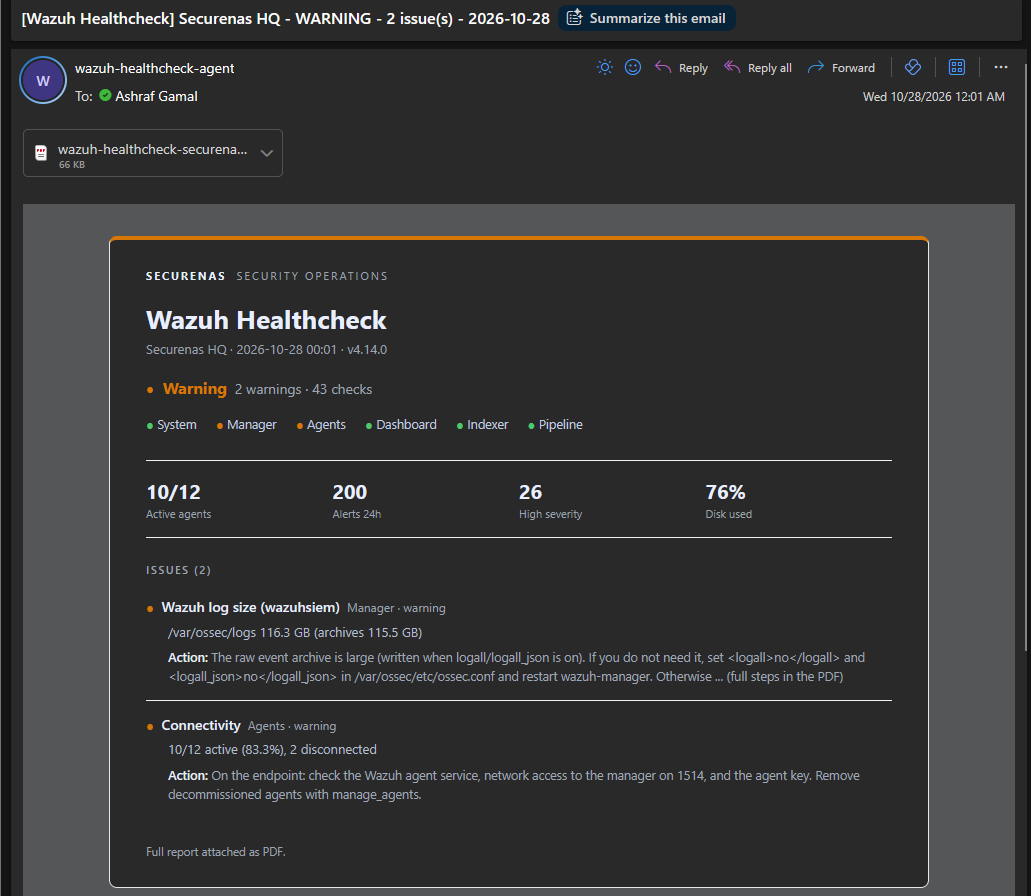
The following three images show additional pages from the actual generated healthcheck PDF. Each opens at its original resolution when selected.
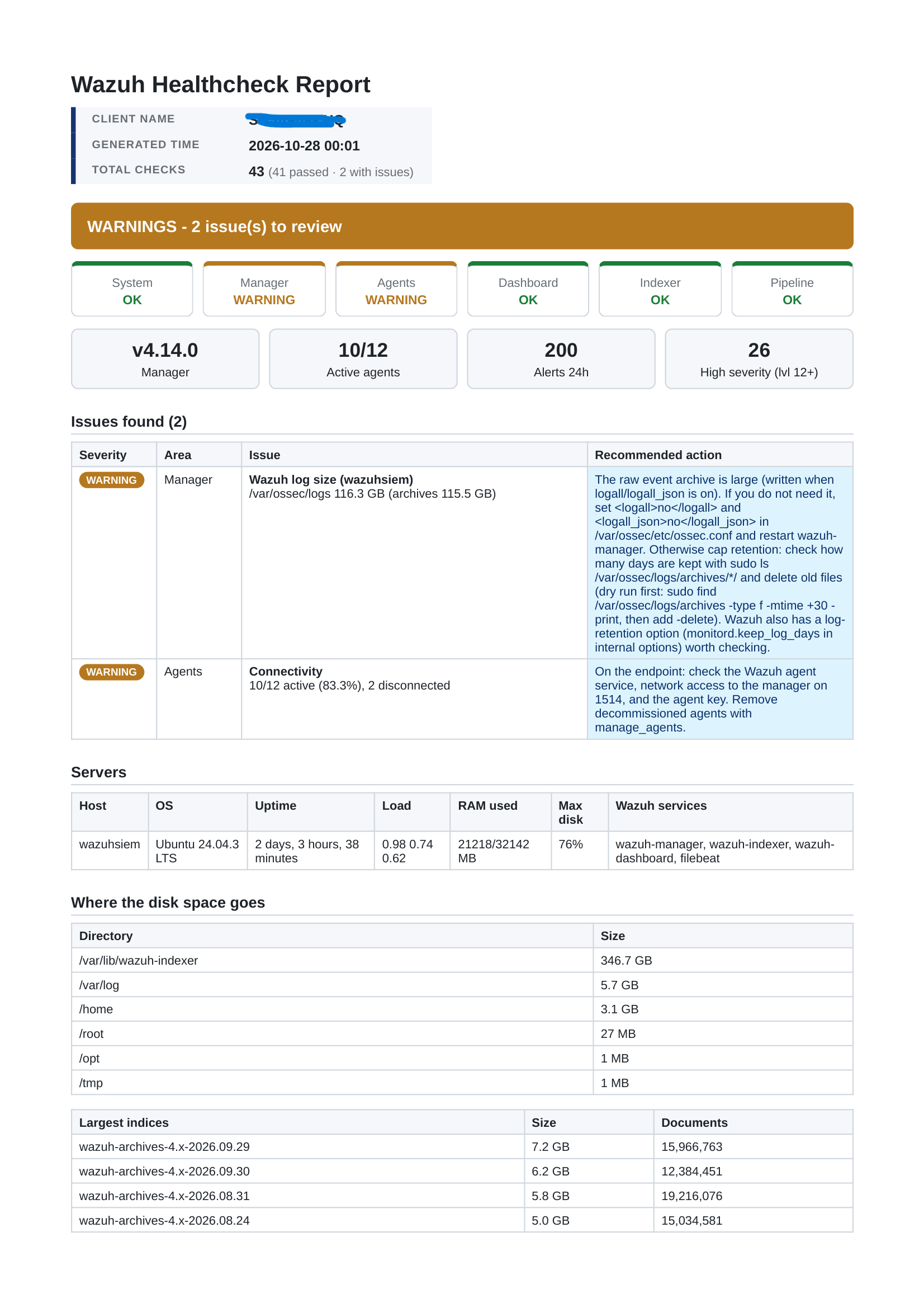
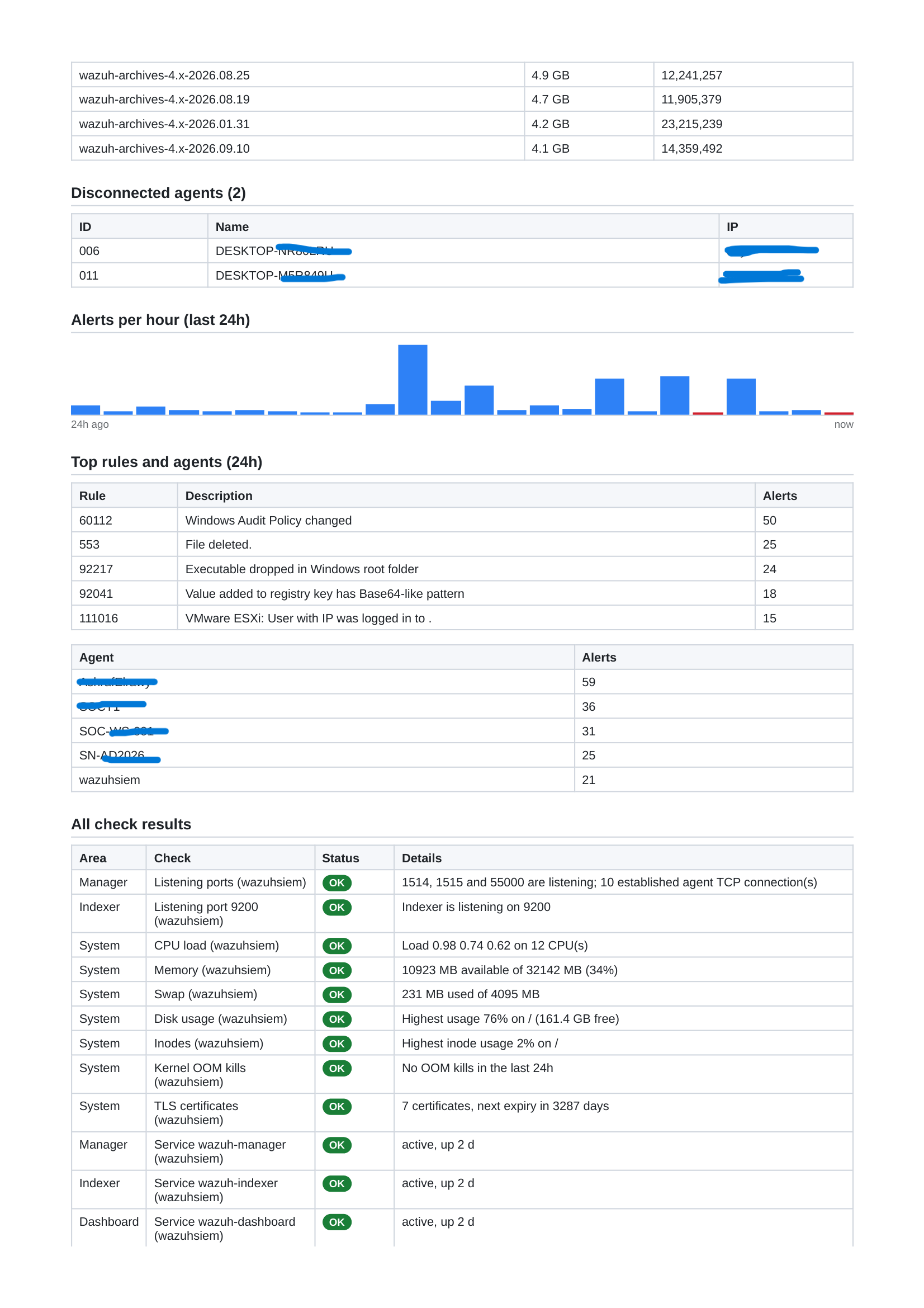
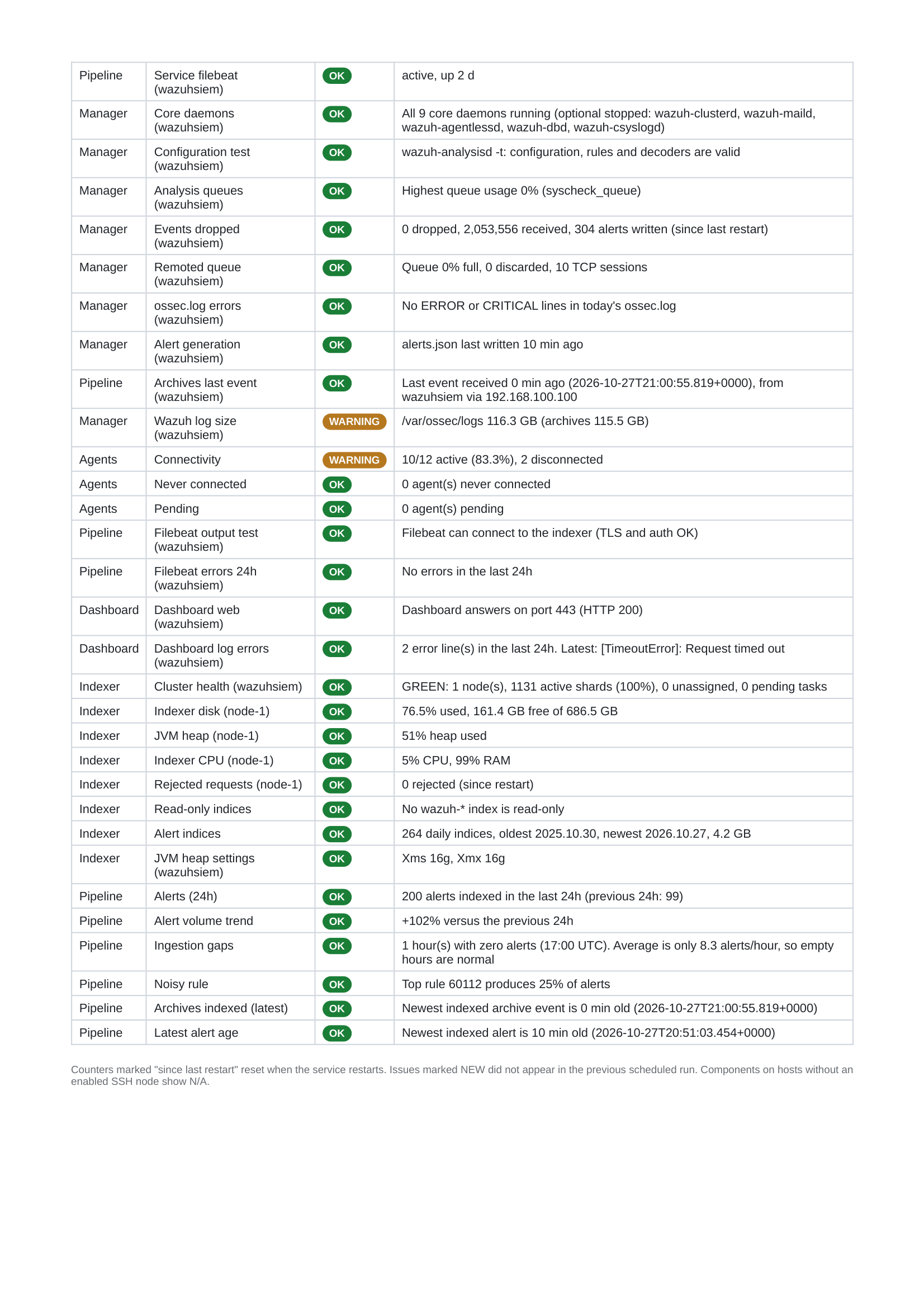
- Summary: total checks, passed checks, warnings, manager version, active agents, alert count, high-severity count, and disk utilization.
- Component status: System, Manager, Agents, Dashboard, Indexer, and Pipeline.
- Issues and actions: an issue description, severity/area, evidence, and a recommended next step.
- Capacity detail: server resources, the largest disk-consuming directories, and the largest indices.
- Activity: alerts over the previous 24 hours, top agents, top rules, and disconnected agents.
- Check results: service state, listening ports, queues, event ingestion, Filebeat output, indexer cluster/disk/heap, and selected log/error checks.
In the captured run, the report showed 10 of 12 agents active, 200 alerts in 24 hours, 26 high-severity alerts, and 76% highest filesystem usage. The manager log path was 116.3 GB, including 115.5 GB of archives; the indexer disk check showed 76.5% used with 161.4 GB free. Treat these figures as a dated snapshot, not a sizing recommendation.
Example issue: archive growth
The report flags a large raw event archive. Before changing logall, logall_json, or archive retention, check retention obligations, forensic requirements, compliance policy, and whether raw event archives are used by downstream searches. Do not automate deletion of archived logs as a default remediation.
Example issue: disconnected agents
The report identifies two disconnected agents and recommends checking the endpoint agent service, manager reachability (including TCP 1514 where appropriate), and the agent key. Confirm whether an endpoint was intentionally decommissioned before removing it from agent management.
4. Configuration checklist
The exact settings depend on the environment. Review these items before enabling a scheduled run:
- n8n runtime: use a supported, maintained n8n deployment and restrict access to the editor.
- Timezone and schedule: confirm when the daily trigger should run in the intended local timezone.
- SSH credentials: configure a dedicated credential for each target host in n8n. Do not place passwords or private keys in node code.
- Command access: test each command interactively with the intended account. If a command requires privilege elevation, explicitly configure and audit the permitted command path instead of granting broad unrestricted sudo access.
- Host topology: configure only the SSH nodes that correspond to real roles in your deployment. A single-host, all-in-one environment differs from a distributed Wazuh architecture.
- Report configuration: confirm client label, host labels, thresholds, check output parsing, date/time formatting, and the meaning of each “OK”, “WARNING”, or “N/A” state.
- Gotenberg: configure the reachable base URL and the HTML-to-PDF route. Keep the service on a trusted network and do not expose it publicly without a strong reason and appropriate controls.
- Email delivery: set SMTP/provider credentials in n8n, test the recipient list, and verify the message subject, report name, attachment, and delivery result.
5. Test before scheduling
- Run the workflow manually against a test or non-critical environment first.
- Open the execution and inspect each node’s input and output. Confirm SSH commands returned valid evidence and that command failures are surfaced as failures or warnings.
- Review the HTML output for escaped text, readable tables, missing values, accurate timestamps, and sensible page breaks.
- Check that the PDF opens and contains the same metrics and issue details as the HTML report.
- Verify email delivery and confirm the attachment is the expected PDF—not an HTML error page or empty binary.
- Simulate or safely reproduce at least one warning to ensure warning status and remediation text appear correctly.
- Only after the manual run passes review, enable the daily schedule and monitor its first scheduled executions.
A green n8n execution by itself is not sufficient. The final check is that the report accurately reflects its collected data, converts to a readable PDF, and is delivered to the intended recipients.
6. Security and privacy before publishing or operating
- Use dedicated SSH identities with least privilege and restrict network reachability to the required systems.
- Keep credentials in n8n’s credential store. Never commit passwords, tokens, private keys, SMTP secrets, or real credential IDs/names intended only for your instance.
- Sanitize workflow exports, screenshots, execution logs, generated HTML/PDF files, hostnames, internal IP addresses, email addresses, usernames, and agent identifiers before publishing.
- Review SSH command output and email recipients: reports may reveal service versions, host inventory, alert volume, internal paths, and operational weaknesses.
- Store reports according to your organization’s retention and data-classification requirements. Restrict the mailbox and any archive where PDFs are kept.
- Use read-only collection by default. Keep destructive cleanup, configuration changes, and service restarts out of an automated healthcheck unless separately approved and change-controlled.
7. Sharing a reusable workflow export
n8n workflows can be exported and imported as JSON. A screenshot or this article is not an importable workflow by itself. Before publishing a companion JSON export, remove instance-specific settings, sanitize hostnames and recipient addresses, and check node parameters, credential references, expressions, and any embedded code for sensitive data.
To import a workflow export, download the JSON file, choose Import from File in n8n, configure credentials and environment-specific values, and test manually. Review every node and email recipient before activating the workflow. Credentials usually need to be configured in the target n8n instance rather than expected to transfer with an export.
Decide and state a license for the workflow file before inviting public reuse. Making a file public does not by itself establish permission to redistribute or adapt it.
8. Troubleshooting notes
| Symptom | First things to inspect |
|---|---|
| SSH node fails | Credential type, target hostname, TCP reachability, host key verification, account permissions, command path, and command exit status. |
| Report shows blank/incorrect metrics | SSH stdout format, JSON parsing, whitespace, missing commands, locale differences, and whether the Build Report code matches the deployed command output. |
| PDF conversion fails | Gotenberg reachability from n8n, endpoint path, multipart file field name, request timeout, HTML asset loading, and the HTTP response body. |
| Email sends without a PDF | Inspect the PDF node binary output and the Email node’s attachment/binary property configuration. |
| Schedule runs at the wrong time | Review n8n timezone configuration, workflow schedule, host timezone, and execution timestamp. |
| Optional node returns no data | Check whether its execution is intentionally disabled, whether the host role exists separately, and whether downstream code handles absent outputs as N/A. |
9. References
This is a practical engineering note, not official vendor documentation. Verify commands against your Wazuh version and deployment layout. Validate operational changes under your organization's change-control, data-retention, and security policies.
How do you handle SIEM health validation in your SOC: manual runbooks or automation?
Share your approach in the comments or connect with me to discuss Wazuh operations, n8n workflows, and SOC engineering.